Share the post "Strava Launches Quick Edit for Simplified Activity Customization"
Strava, the leading online sports community with over 125 million users, announces the launch of the Quick Edit feature, which simplifies the management, updating, and sharing of activity details. This new feature makes it even easier for users to customize their sports experience and make each ride unique.
Source: Press Release
Quick Edit is accessible to all Strava users. It provides instant access to the most common edits and privacy settings as soon as the app is opened after an activity is synced from a device. In just two clicks, users can control the visibility of their activity, hide specific data such as start time, customize their session title, hide the route map, and add photos or videos. This simplified process allows everyone to take control and tell their own authentic sports story.
Keira D’Amato, professional marathon runner, said: “Editing my activity title is a personal way to reflect the effort I put into it. It’s a fun and creative way to express how I felt throughout the session, and, more broadly, to connect with others who might be inspired, relate, or simply share a good time.”
“Every activity upload offers Strava athletes the opportunity to personalize the story that accompanies their effort. Quick Edit gives our users the power to easily adjust what they share and how they interact with their community,” said Zipporah Allen, Strava’s Chief Business Officer.
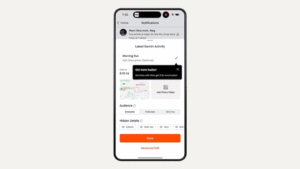
- Audience Settings: Choose who can see activity details — everyone, followers only, or just the user.
- Hide Details: Hide certain information, such as start time, pace (for running), power (for cycling), calories, or heart rate, from other users.
- Activity Title: Strava data reveals that activities with a title receive nearly 4 times more kudos. Now, users can easily replace automatic titles (“Morning Run/Workout/Ride”) with their own custom title. These unique titles also make it easier to search and review activities later.
- Map Visibility: Decide to hide the entire route and map for each activity.
- Photos and Videos: Upload media to visually enrich the activity’s story, highlighting routes and key moments.
If no changes are made on the Quick Edit screen, the user’s default settings will automatically apply.
For more advanced customization, the advanced editing option is also available on the Quick Edit screen, allowing users to click once to add private notes, choose gear, adjust sport types, select map styles, and specify workout types.
Quick Edit was unveiled at Strava Camp, the platform’s annual event. It is part of a series of recent innovations, such as dark mode, family subscription, and weekly heatmaps, demonstrating Strava’s ongoing commitment to enriching and improving the user experience while maintaining its accelerated pace of innovation.
Share the post "Strava Launches Quick Edit for Simplified Activity Customization"