Share the post "Wahoo Elemnt Bolt V2 Bike Computer Review"
The Wahoo Elemnt Bolt V2 aims to replace the Bolt, which helped the American brand make a name for itself in bike computers. Because while Wahoo is now a leader in indoor cycling, meaning smart indoor trainers, they also compete very well with Garmin in the GPS bike computer market.
By David Polveroni – Photos: ©3bikes.fr
This one-month test focuses on the Wahoo Elemnt Bolt V2, a recent winner of the Ronde Van Vlaanderen with a certain Mathieu Van der Poel.
Upon unboxing, you will find:
– 2 mounts (stem and out-front)
– 1 USB-C cable
– The quick start guide and the bike computer, of course.


Presentation
It retains the format characteristics of the Bolt V1, with dimensions of 4.7 x 7.7 x 3.1 cm, a smaller format than the Roam, Wahoo’s second model. A format that I would describe as ideal, neither too small to be easily readable nor too large to feel like you have a tablet on your handlebars. At 70 g, bare, it also remains lightweight, even if weight is not the primary criterion for a bike computer.
The main difference from the old model is the screen; it’s the first thing that stands out. Its size has changed very little, 2.2 inches, or 5.5 cm diagonally. For comparison, Garmin’s competitor is 2.6 inches, or 6.6 cm.

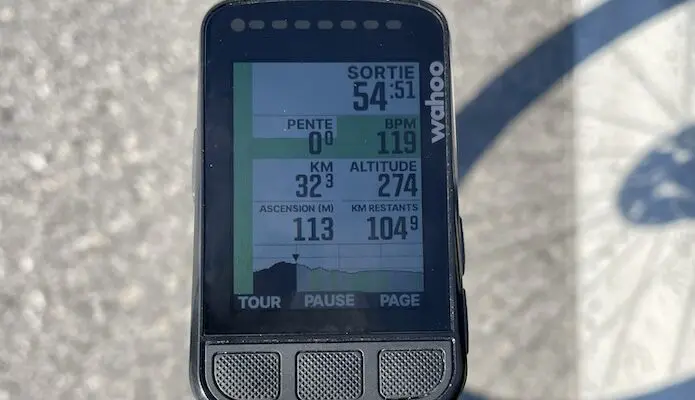
But the addition of colors (64!) gives it a more pleasant and easier feel when reading data, as we will see a little later in the description. In addition to colors, the screen has high contrast, which enhances readability, even without backlighting to save battery…
Finally, it is equipped with a Gorilla Glass screen, which ensures good durability and limits scratches. In reality, this is also what we observed: it exudes solidity, and no scratches have been reported after these 6 weeks of testing, even though I intentionally put it through its paces. It’s like new after 3500 km.
Regarding the screen, this is a non-touch model, with improved buttons compared to the previous range, but also compared to the Roam (the highest model in Wahoo’s range), which suggests that it too should benefit from a new version soon…
The buttons have their advantages: scrolling through pages, a basic task that can sometimes quickly become complicated in the rain or with winter gloves, is therefore mastered and improved on the Bolt V2. The first version tended to be a bit stiff, which has now been changed.
Regarding charging, I regret the switch to a USB-C cable instead of USB. Yes, it means yet another cable to carry. But it allows for faster charging of the bike computer.
Setup
To set up the bike computer, you must use the Wahoo Elemnt smartphone app. After scanning the QR code and registering the device, you can then configure the screens.

It is possible to configure the desired number of screens, with nine data fields on each. Each screen can be zoomable. This is a feature unique to Wahoo; with the right-hand buttons (or satellite buttons on the handlebars, integrated into the new Shimano 12 and SRAM groups, and with the EWU111 on Shimano 11-speed), you can at any time reduce the number of data fields on the screen to focus more on certain ones that have been pre-ranked by priority.


There is also very good mapping, just like on the Roam. Maps are preloaded, and there’s nothing to buy. On the map screen, you can display four data fields, compared to two on the Bolt, and the elevation profile of the current ride or programmed route.
Sensors are linked via the bike computer and then configured with the app. Most Bluetooth and ANT+ sensors are supported, including satellite buttons from Shimano or SRAM.
=> SEE ALSO: Buy the Wahoo Elemnt Bolt V2 bike computer for €269.99
On the Road
Once you press the center button, the ride starts, and all you have to do is ride! Auto-pause can be activated or not. You can program workouts via the free Trainingpeaks platform, quite simply once you get the hang of it.
We really liked this workout tracking feature. It’s quite fun with real-time visualization of intervals. The color also helps visualize work zones for those with well-defined plans. And for others too! Power, heart rate, and also gradient since the last update, have color codes. This means that the more the data increases, the more alarming the colors become! Grey… Blue… Green… Yellow… Red…
This new update concerning the gradient brings it closer to Garmin’s Climb Pro feature, which, in my opinion, remains ahead in terms of navigation thanks to this widget: knowing how long until the next climb begins, its percentage, and its profile is a big bonus.

Wahoo has worked hard on this point, and now we can visualize the upcoming profile in real-time, a little less precise than Climb Pro, but it gives a good idea of the terrain we are on.
Note that a live track function is possible, but we (and other users too) have experienced many setbacks and random, episodic, and haphazard operation without reason.
Route tracking is quite well designed on a clear and sharp map. Arrows guide you, as well as text at each intersection, and it recalculates a route if necessary. Routes are automatically loaded via Wi-Fi once they have been created on a third-party application like Strava, Komoot, or any GPX file by transferring it to the Elemnt app.

In practice, it works well, or almost… If you don’t want to quit/stop the route or get more info in the section, otherwise the bike computer froze and rebooted several times during a ride. The ride recovery worked well, so there were no consequences, but it’s really annoying when it happens. This is a point Wahoo is still working on.
You can activate LEDs at the top of the screen that can represent HR, Watts, speed, and which, like on the screen, change color depending on the intensity. But we strongly advise against using them, not so your friends can see where you are with a glance, but the battery will be much better optimized. Just like the backlight, which is largely sufficient… on OFF! This way, you can get about 12 hours depending on the sensors used.
Another quite important point, the V2, like all Wahoo bike computers, has a barometric sensor, insensitive to humidity unlike its competitor. No more crazy altitude data in bad weather…
The Strava Segment Live feature is more advanced than Garmin’s, in my opinion. The page itself allows you to better position yourself in relation to the effort in progress. A good estimate of the time you will achieve as you progress through the effort and with your times on each of your favorite segments once completed. Upon return, the transfer is done automatically to the Elemnt app, then to connected platforms for those who are connected. It is easy to configure and well explained.
Overall, the Elemnt Bolt is very pleasant to ride. Daily use is quite simple, and it fulfills all the functions required for cycling, whether for workout tracking, navigation, or readability of essential information. Halfway between the Edge 530 and the 830, offered at a price of €299, it is surely one of the best value for money/features/price on the market. For those who already own the first version, upgrading to the 2 is of little interest, unless you want to refresh your field of vision!
The WAHOO ELEMNT BOLT V2 in brief… Rating: ***** Pros: price/feature ratio, color screen, barometric sensor accuracy Main features: Preloaded maps: France, Belgium, Germany, Austria, Denmark, Netherlands, Sweden, Spain, Canada, United States, Australia, England, Scotland, Wales – Free additional maps: downloadable via Wi-Fi through the ELEMNT Companion app – Turn-by-turn directions: generated by the device as well as routes from Ride With GPS, Komoot, STRAVA, and almost any other route source file – Get Me Started (allows returning to the starting point) – Route To Start (shortest path to the starting point) – Back on Track (redirection on demand) – Take Me To (route creation on demand) – Track Back (trace the route traveled) – Saved locations (on device and app) – Weight: 70 g – Price: €299 Contact: wahoofitness.com |
=> SEE ALSO : All our Gear articles
Share the post "Wahoo Elemnt Bolt V2 Bike Computer Review"