Share the post "Indoor trainer: what equipment do you need for Zwift?"
By Guillaume Judas – Photos: Elite, Zwift, DR
As winter begins with falling temperatures and sometimes bad weather, a new lockdown has been added to try and curb the worrying increase in Covid-19 cases. All these elements do not favor outdoor cycling. Swimming pools and gyms are also closed, while even running is restricted to a one-kilometer radius around the home.
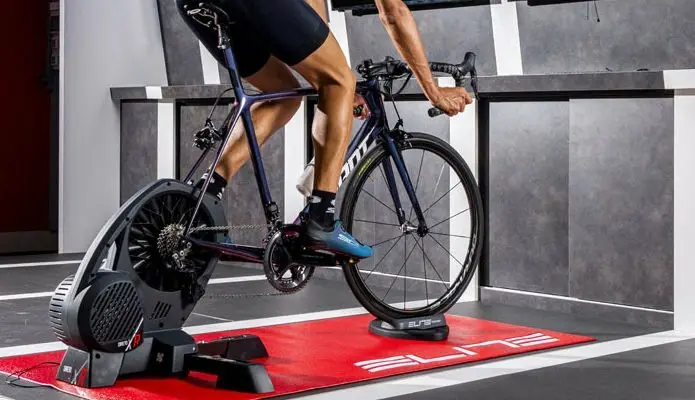
This situation benefits connected platforms that allow you to cycle virtually by following a route on your computer, tablet or smartphone, or even on your TV if you have a compatible device. These platforms, of which Zwift is the most famous, offer several possibilities for real training sessions with an indoor trainer, group rides and even virtual competitions with users from all over the world. Note that Zwift is also open to runners, who train on a treadmill.

Unlike Bkool or Kinomap, for example, there is no possibility to import video routes, import profiles from a GPS track, or even draw your own routes on Zwift. Instead, you evolve within several virtual worlds of your choice, each with different circuits offered, or you can ride as you wish by exploring the map and choosing the direction you want to take at each intersection using the “arrow” key on your computer or tablet.
These circuits are more or less difficult in terms of the elevation offered. The realism of the sensations largely depends on the equipment you have. But with a good smart trainer, you clearly feel the difficulty and you have to use your derailleur to tackle the climb, or more precisely the resistance of the indoor trainer which follows the data provided by the software. It is also possible to feel the effect of descents (with very low resistance), which allows you to accumulate kilometers much more easily than with basic indoor trainer practice.
| WHERE TO FIND AN AVAILABLE INDOOR TRAINER? Manufacturers and importers are struggling to meet the enormous demand for indoor trainers, especially during this lockdown period. Nevertheless, we have found a few devices still available for you:
|
The principle of Zwift is based on the power developed, real or simulated (depending on your equipment), and on data such as weight or the equipment used in the application. The higher your power-to-weight ratio, the more efficient you are in climbs, while a high raw power is an advantage on the flats. The more accurate your indoor trainer or power meter, the closer you ride to reality and your true level on the road. Important data that leads some to cheat on the weight entered in their profile, or to accommodate a poorly calibrated indoor trainer, which clearly boosts their performance in the application. But that’s not really the important thing, since Zwift is first and foremost a training tool and for improving physical condition, and everyone eventually gets caught up by the reality of the terrain.
On Zwift, there is no wind, but you do move slower on certain degraded road sections or on Gravel-type paths, and above all, you can feel the effect of drafting with other connected users. Because the application is also a platform for virtual encounters where you can ride with friends, join groups, organize events, thus benefiting from the pace of the peloton, or compete in various competitions.
This is one of the main reasons for Zwift’s great success, to which is added an undeniable playful aspect since by riding you can also unlock badges, accumulate points that allow you to virtually buy a new bike, new wheels, new outfits for your avatar, which you can also customize (skin color, hairstyle, beard, etc.). Frequent new challenges are also offered to motivate you to ride.
If you prefer to opt for a more structured training, this is also one of the possibilities of the application, with training plans, tests, and even the possibility of creating your own sessions based on power. All these options are included in the subscription, and can thus cater to practitioners of all levels, from professional to beginner, including this new generation of e-cyclists who almost never ride outdoors.
How to connect to Zwift?
Zwift is a paid application after a short discovery period, the price of which remains reasonable at €14.99 per month, and which allows you to unsubscribe whenever you wish. To ride on Zwift, you first need an Internet connection, then download the application, register, and at least a computer, tablet or smartphone that can communicate with one or more sensors on the bike or on the indoor trainer. The application works equally well on Mac or PC, as on all smartphone operating systems.
You then connect your indoor trainer and/or your heart rate monitor, power meter, speed sensor, cadence sensor via ANT or Bluetooth to the main device. Be careful, because if you are using a sensor with the ANT protocol only, you may need an additional ANT dongle to connect it to your computer or smartphone.
Zwift supports a number of smart trainers. But you can still ride on the app with a basic indoor trainer, provided you have at least a speed and cadence sensor. Power is then calculated by an algorithm to allow you to progress in the application, and you don’t feel any variations in difficulty when pedaling. You then have to change gears with your derailleur to provide more power, if you want to follow other cyclists on climbs, for example. A heart rate monitor is a plus, first to monitor your own effort management, but also to validate your level of involvement with other users, especially if you are using a basic solution without a connected device, with all the deviations that this can entail. Finally, a non-connected indoor trainer but with a bike equipped with a power meter gives more accurate results, even if you also have to use the derailleur to provide more or less power to overcome difficulties.
| ADDITIONAL ACCESSORIES… To equip yourself and ride on Zwift, you might need the following additional accessories:
|
Before riding, you can complete your equipment with a fan to avoid overheating and heart rate drift, or prefer to place yourself in a cool place like a garage, or even outdoors. But in this case, check your Wi-Fi connection carefully so you don’t get disconnected in the middle of a session. Don’t forget a towel and water bottles, especially if you plan to ride for a while.
For the biggest geeks among you, there’s also the option of equipping yourself with complementary accessories, such as Wahoo’s Kickr Climb which adjusts the bike’s orientation according to the gradient, the Headwind fan from the same brand which blows air according to your speed or heart rate, or the Elite Sterzo Smart steering plate which allows you to change direction or move within the peloton by turning the handlebars in the application. Finally, you can also mirror your computer or smartphone screen to your TV using an HDMI/Wi-Fi dongle to enjoy total immersion in the application.
Getting started on Zwift
When you launch the application, you arrive on a home page that summarizes the connection status of your devices. Start a search to connect your various sensors. Just below the image of the smart trainer, if you have one, there is an icon with a small wrench that allows you to check the calibration of your device, which is recommended by Zwift once a week if you are a regular user.
Once the connection step is complete, you arrive on another page where you can choose the virtual world you want to ride in. Watopia is a virtual island always accessible, with 30 routes available, from 4 to 128 km and up to nearly 2400 m of elevation, including the famous Alpe du Zwift, a Zwift version of Alpe d’Huez. If you choose one, you just have to let yourself be guided. But you can always ride as you wish by exploring any road as explained above. Each day of the week, according to a calendar defined by Zwift, two other worlds are accessible from the following list: London (13 routes), Innsbruck (5 routes), New York (10 routes), Yorkshire (5 routes), Richmond (3 routes), France (7 routes, including the ascent of Vent-top, a Zwift version of Mont Ventoux), and Paris (the Champs-Elysées circuit in both directions, which you can of course do several times).
In the menu on the right, you can modify the appearance of your avatar, view your equipment and buy new if you have enough points (which are earned by accumulating kilometers), and modify some parameters, such as the resistance of your indoor trainer if it is a smart device. Be careful, this function does not modify your power or allow you to ride faster. However, it allows you to optimize the gear range of your bike, and to act as if you were changing the cassette at the rear with larger cogs, for example. A function that can be useful if you find the resistance of the indoor trainer too high and you feel like you are forcing too much on climbs.

In the top left, you’ll find the “workouts” menu, with predefined specific sessions, tests, or the ability to create your own sessions. The smart trainer then adapts its resistance according to the defined power, regardless of the course you’re riding on.
At the end of the session, you save before quitting, and Zwift directly sends your ride to Strava if the two accounts are linked. Unfortunately, each save is accompanied by a shutdown of the application, which you must reopen if you want to explore another course or participate in a race or event after a simple warm-up. Be careful because on Zwift, time is time, and take the necessary time to be on the line a few minutes before the start, taking into account the time needed to reconnect. Because no one will wait for you!
Zwift Companion
You can download a complementary smartphone application (free), called Zwift Companion, which allows you to access the event calendar, organize group rides, change your avatar’s view and on the map, and even communicate with other participants via messages. And as they say on Zwift: Ride On!
=> SEE ALSO: All our Gear articles
Share the post "Indoor trainer: what equipment do you need for Zwift?"