Share the post "Review of the new Wahoo Roam GPS bike computer"
After the Elemnt, the Bolt, and the Mini, here is the Roam, the new GPS bike computer from the American brand Wahoo. Among the new features are a color screen and several smart navigation functions to make your life easier before getting on your bike and while you’re riding. After six weeks of testing, here is our detailed verdict.
By Pierre-Maxime Branche. Photos: 3bikes.fr

Monochrome is out, color is in! After the Elemnt, the Elemnt Bolt, and the Elemnt Mini, Wahoo launched its fourth bike computer in early May, its third GPS (the Mini does not offer navigation) and its first with a color screen. Most importantly, this new Roam features several new smart navigation functions to, for example, automatically return to a planned route if you get lost, create a new route on the fly, or find the fastest way home. This Roam accompanied and guided our training rides during the last six weeks. Here is a detailed presentation of this new American GPS bike computer, available at a price of €349.99.

Design and Ergonomics
For those familiar with the brand, this new Roam is smaller than the Elemnt, but larger than the Bolt and the Mini… naturally. It’s not a bulky bike computer like those from Garmin or Sigma; its dimensions (89×54.4×17.8 mm) allow it, for example, to easily fit between your extensions if you’re using a time trial or triathlon bike, for a weight of 93.5 g. It features an aero design, a signature of the Wahoo brand, especially when paired with its out-front mount. The stem mount, on the other hand, uses zip ties (provided in the box), which is not practical if you use multiple bikes, not to mention the potential damage they can cause to the stem.

Regarding buttons, we find the same six as on the Bolt: on/off and menu access on the left, three buttons at the bottom for start, pause, stop, recording a ride, and switching between pages, and the last two on the right for zooming in or out on a page. Some adaptation time while riding is necessary, especially for the three bottom buttons. Despite their width, it is much easier to press them with a fingernail than with the fingertip. Similarly, the zoom buttons on the right side require a firm and decisive press, otherwise you risk having to try multiple times.

Screen
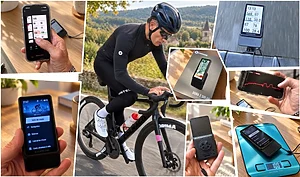
Although its footprint is slightly smaller than the Elemnt, the Roam offers the same screen size, a diagonal of 68.6 mm (2.7 inches). It uses a thin and light, clear crystal Gorilla Glass (non-touch), like on high-end smartphones. This 240×400 resolution color screen is perfectly bright because it has an ambient light sensor that automatically adjusts its brightness as well as that of the Quicklook LEDs (5 at the top and 7 on the left) which allow you to monitor essential parameters (speed, HR or power) at a glance, which you will have previously set. This screen is large and readable enough to have a maximum of information on the same page, from 2 up to 11 data fields at the same time. And these data are visible regardless of the viewing angle on the glass.
Connectivity
The Roam has a USB port for charging. For the rest, it is 100% wireless via Wi-Fi, Bluetooth, and ANT+ connections to synchronize your routes, your sessions to the applications and platforms of your choice, download maps, and even for software updates. Connected to your phone, it provides incoming calls and SMS if someone tries to reach you. Finally, for indoor trainer sessions, it can control non-Wahoo devices equipped with ANT+ FE-C technology.

GPS
Numerous satellite systems are supported by the Roam: the traditional GPS (USA) and Glonass (Russia), to which must be added the European Galileo system, Chinese BeiDou, and Japanese QZSS. This multiplicity of systems gives it excellent accuracy once the satellites are acquired, as it can take a little time to locate you. Once this operation is successful, there are no problems. The tracks of your route are very clean; we have never seen an approximate trace. However, the integrated altimeter, which is based only on these satellite data, lacks precision. At sea level, it always indicated a deviation of 20 to 30 m. A deviation that we found at the summit of various climbed passes and then, after the various synchronizations, during training analyses.

Interface and Data
Once you understand the Roam ecosystem, this bike computer is very simple to use, and navigating between the different pages is quick. There are three main pages: data, another with a live elevation profile of your ride at the bottom, and the mapping/navigation page. This is largely sufficient, and most importantly, they are fully customizable. In our opinion, it is not necessary to create multiple data field pages because the zoom buttons on the right allow you to select the information you want to prioritize (from 2 to 11 data points).
Cadence and power calculation enthusiasts will be the most frustrated. Pedal cadence requires the addition of an external sensor. For power, it is indicated, or rather estimated, via the Quicklook LEDs using a color scale. To do this, you must enter your FTP value (i.e., your maximum power threshold over a 1-hour effort) into the application. Conclusion: if you know it, you then benefit from an estimation by a color code; if you don’t know it, which is certainly the case for most of us, there is no power indication. Or, you have to perform one of the proposed training tests to get an estimation there too. For the rest, all the classic data is present and largely sufficient.

Mapping and Navigation
Maps of North America, Europe, Asia, Oceania, and South America are preloaded on the device. Maps of Russia, Asia, and Africa can be downloaded for free using Wi-Fi. To speak only of France, the roads are extremely precise and faithful for easy navigation. Indications appear large on the screen, the map zooms in on intersections, the LEDs flash… everything is done to ensure you don’t miss a turn on a preloaded route, especially since navigation is clearly indicated by large black or blue chevrons when you’ve taken the wrong road to rejoin your track. It is in this section that we find several new navigation options:
– Go to Route, to join a route imported from a third-party application;
– Back on Track, to put the cyclist back on the right path if they have taken the wrong road, with, however, a slight latency encountered several times;
– Take Me To, which allows you to select a location on the map and navigate to it, a very practical option to use before starting but also and especially during training. To do this, a target placed on the map moves up and down and left to right to find the location of your choice;
– Saved Locations, to store regularly visited locations to save time;
– Route to Start, the Roam then finds the shortest way to return to the starting point of your ride;
– Finally Retrace Route, an option that reverses your route to return to the starting point. And when we say “reverses,” it must be understood literally, meaning that it happened to us that the Roam told us to take roads in the wrong direction since they were one-way on the way out… In several situations, the Roam took a long time to propose an alternative route. A shame and surprising.

While these different options are interesting and practical, they have the disadvantage of imposing a route on you without being able to tell the Roam that you want to make a detour via such and such a point, or prioritize such and such a road. The ideal would have been for the Roam to offer a choice of several routes to reach the targeted location.
Route Creation
Wahoo has worked on navigation by offering multiple possibilities to reach a determined point, to find your way back, or to return home. Even if, as we have just seen, these options are not fully optimized since they constrain you and do not offer alternatives. Unfortunately, the other drawback of this new Roam is that route creation is simply impossible, or almost. Wahoo focused on pure and simple navigation, with clear and effective instructions and information, but the brand completely neglected this aspect, which is very important today. Indeed, it is impossible to create a point-by-point route on the map via the application. It is impossible to ask the Roam to suggest a 3-hour, 90 km route heading west. We were told that the Roam is not intended to compete with a Garmin 1030 or a Sigma Rox 12, for example. Its price point limits its offering. To create your route, you must therefore use an external application before importing it into the Roam. What a frustration! For us, this is a real disappointment for an option that, at a price of €349.99, should still be offered, even in a simple point-by-point configuration, via the Elemnt Companion application. In the sections: Training => Routes => Go to… it is possible to set waypoints, but after a few points, the Roam will optimize the route and bypass the previously noted points. A headache.

Connected Applications
The Roam is compatible with many applications that allow you to either create routes or plan workouts: Strava, of course, with Strava Live Segments if you have a Premium (now Summit) subscription, but also Ride with GPS, Training Peaks, MTB Project, Best Bike Split, Komoot, Today’s Plan, Singletracks… The integration of routes or sessions from these applications and their synchronization are instantaneous. However, unlike Connect IQ for Garmin, Wahoo does not have its own application to customize your bike computer’s environment.
Battery Life
According to Wahoo, the Roam’s battery life is 17 hours, the same as the Elemnt and 2 hours more than the Bolt. This estimate is faithful to reality for us; we pushed the Roam during the first full charge to 16h15 and during the second charge to 16h, asking it to search for several routes in the middle of each ride to make it work. In simple use, without changes or searches for new routes, the 17 hours would have been largely exceeded. That said, the charge indicator is not visible on the main screen of the Wahoo when it is on. You have to go to the menu to find out what percentage of charge is still available or to the application. In addition, the Roam only warns of low charge when it is almost ready to die, which twice resulted in us being without navigation and data. Nothing serious, of course, but integrating the device’s charge on the main data screen would have been a good idea.
Training
Interval sessions are preloaded into the Roam, as well as sessions inspired by Team Ineos coaches (sprint, climbing, or mixed). Enough to train like a pro and fly up climbs like Egan Bernal and co. You can also synchronize them from Training Peaks or Today’s Plan, or perform one of the two available FTP tests. Nice and fun, these sessions have the merit of being there, but they are not numerous and are not customizable. Nothing beats a good session designed by yourself to import from a third-party application (again).

Price
The new Wahoo Roam is available at a price of €349.99. At this price, the pack contains the Roam unit, two mounts (an out-front mount for the handlebars and a stem mount with three zip ties) as well as the USB charging cable. If you want a cadence sensor, you will have to pay an additional €39.99 (RPM Cadence) and €79.99 for the optical Bluetooth and ANT+ heart rate armband. That’s €470 if you need or want to equip yourself at home.

Conclusion
We won’t lie, we were eagerly awaiting the test of this new bike computer, but in the end, small disappointments prevail. Certainly, the color screen is pleasant and effort has been put into the navigation tools, but we are left with a feeling of incompleteness. These navigation tools impose routes when they should offer alternatives, and it is impossible to create your own route without using a third-party application. This is obviously not insurmountable, but in our eyes, it’s a real shame because there are many good points. However, when we talk about “freedom to explore” or “making every bike ride a new adventure,” there is a feeling of restricted freedom.
| WAHOO Roam |
| * Pros : color screen, navigation options, integration, interface ergonomics, GPS accuracy, connectivity GPS with extended navigation functions |
| Contact: www.wahoofitness.com |
=> SEE ALSO: All our Gear articles
Share the post "Review of the new Wahoo Roam GPS bike computer"